
Audio Sounds Bad
Streams don't modify your audio. They just receive and relay whatever you send, monkey see, monkey do. If something sounds bad, it's coming from your broadcasting software or your source files.
Applies to: all plans.
Symptom
Your stream sounds muffled, crackly, distorted, or lower quality than expected. Your mic sounds static-y or crackling.
The fundamental rule
Our servers are relays. They receive whatever your broadcasting software sends and pass it straight to listeners, untouched. We don't process, compress, or modify audio in any way.
This means: if it sounds bad on the stream, it sounded bad before it left your computer. The fix is almost always on your side, in your broadcasting software or your source files.
MIXXX mic crackle (the most common one)
If you're using MIXXX and your mic sounds static-y or crackling on the stream, the fix is the Audio Buffer setting.
Open MIXXX, go to Preferences, then Sound Hardware. Set Audio Buffer to 46.4 ms:
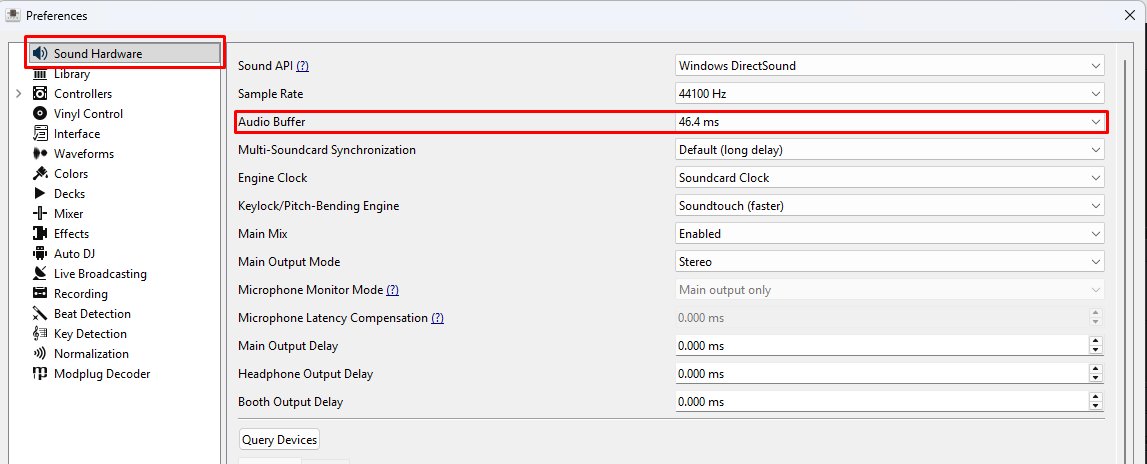
Apply, then restart your broadcast. The crackling should be gone.
Other things to check
- Source file quality. If you're playing 96 kbps MP3s, no stream can make them sound better than 96 kbps. Use higher-quality source files (256 kbps and up, or lossless).
- Output bitrate. Make sure your broadcasting software is set to send at the highest bitrate your plan allows. Lower bitrate = worse audio. S Plan caps at 192 kbps; M, L, and AUTO-DJ go up to 320 kbps.
- Microphone gain. If your mic levels are pegging into the red in your software, you're clipping the input. Listeners hear distorted audio. Pull the gain down so peaks stay below the red zone.
- Compression / effects in your software. If you've enabled limiters, compressors, or EQ in your broadcasting software and they're too aggressive, they'll squash the audio. Try with all effects off and see if it sounds better.
What it usually isn't
A server problem. We don't process audio, only pass it along. The same audio data your software sent is what your listeners receive, every time.
If your stream is stuttering or dropping out, that's a different problem, see Stream Cuts Out.
If MIXXX is specifically stuttering after a recent Windows update, see MIXXX Stuttering on Windows 11.
Still stuck?
Reach out and we'll help you get unstuck.